The Ultimate Guide to Color Palette Extraction: Extract HEX, RGB & Color Schemes from Images
Learn how designers and developers instantly extract color from images, identify color palettes, and grab HEX & RGB codes using a free browser-based eyedropper.

Whether you are designing a modern web application, assembling a brand identity guidelines deck, or building CSS design tokens, finding the exact colors from an inspirational image is an everyday necessity. In the past, designers and developers had to launch heavyweight desktop software like Adobe Photoshop, wait for slow cloud services, or install clunky extensions just to identify a single HEX value.
Today, browser-based color extraction has transformed creative workflows. With a modern image color eyedropper and intelligent palette generator, you can extract color from image assets, discover harmonious tints, and copy production-ready color codes in seconds.
In this comprehensive guide, we explore how color extraction works, why accurate palette sampling is vital for digital design, and how to use an online hex code extractor from image tools without installing any software.
1. Why Color Palette Extraction Matters for Modern Design
Color is the single most powerful visual cue in digital product design. It communicates emotional tone, establishes visual hierarchy, guides user actions, and ensures accessibility across diverse devices. Extracting authentic color harmonies from photographs, illustrations, and competitor screenshots unlocks several key benefits:
2. How to Extract Color from Image Files in Seconds
Modern browser technologies, including the HTML5 Canvas API and WebAssembly, allow you to inspect pixel data directly on your local device. You no longer need to upload multi-megabyte photos to remote servers or pay for subscription-based design suites.
Here is the straightforward workflow using our free, browser-based Image Color Picker:
Step 1: Select or Drop Your Image
Open the Image Color Picker & Eyedropper and drag your graphic, photo, logo, or UI screenshot into the workspace. The image renders immediately in local memory.
Step 2: Use the Pixel-Precision Magnifier Eyedropper
Hover your cursor over any portion of the graphic. An interactive loupe magnifies individual pixels, letting you pinpoint exact boundary colors, subtle gradient mid-tones, or delicate drop shadows with single-pixel accuracy.
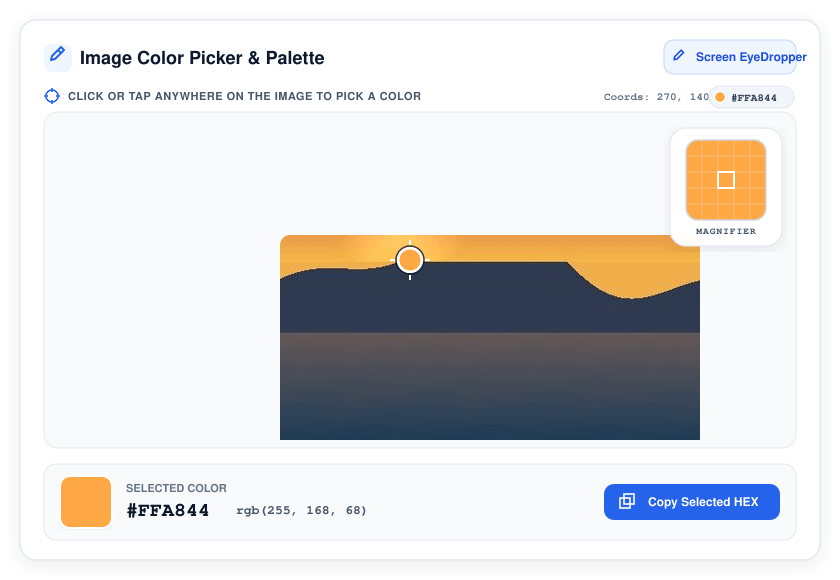 Figure 1: The ImageProBox Color Picker interface in action. The interactive canvas displays crosshair sampling on sunset amber coordinates (x: 270, y: 140) with real-time coordinate tracking and top-right loupe magnification.
Step 3: Copy Instant HEX, RGB, and HSL Values
Clicking any pixel locks the sampled color. The tool automatically displays:
Step 4: Generate a Balanced Color Scheme
Need more than a single shade? Use the built-in color scheme picker from image feature. The algorithm analyzes color frequency and perceptual clustering to extract dominant primary, secondary, and accent colors automatically.
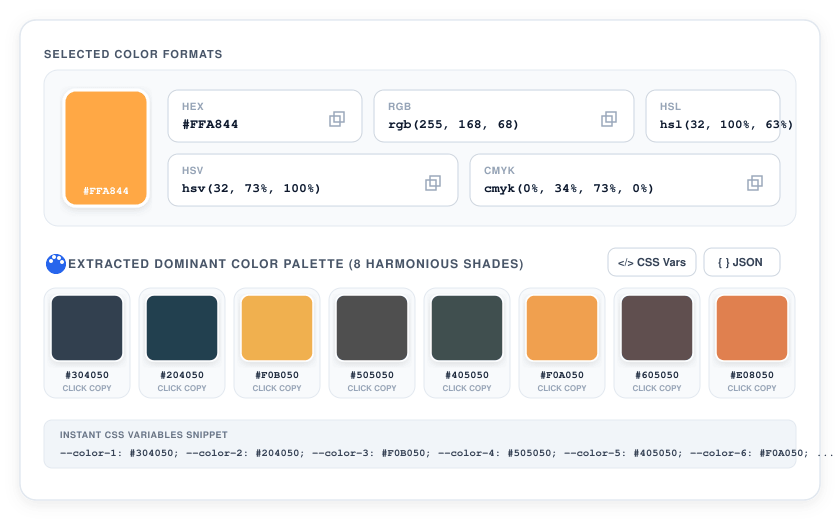 Figure 2: Selected color format cards (HEX, RGB, HSL, HSV, CMYK) and the 8-shade dominant palette generated from the photograph, complete with one-click CSS Variables and JSON export options.
3. Best Practices for Accurate Color Sampling
To get the cleanest color codes from your images, keep these expert tips in mind:
4. Why Use ImageProBox for Color Extraction?
Unlike traditional web utilities, ImageProBox executes 100% of its color extraction client-side:
Ready to sample your next palette? Try our free Image Color Picker Tool now.